
PHOTO EXPERIENCE
TV Girl Photo Editor
Turn one photo of two friends into a translucent pink-and-blue PNG with cute doodles and optional names. Choose each person’s color; AI handles the edit without tracing or painting.
Preview · launch date pending
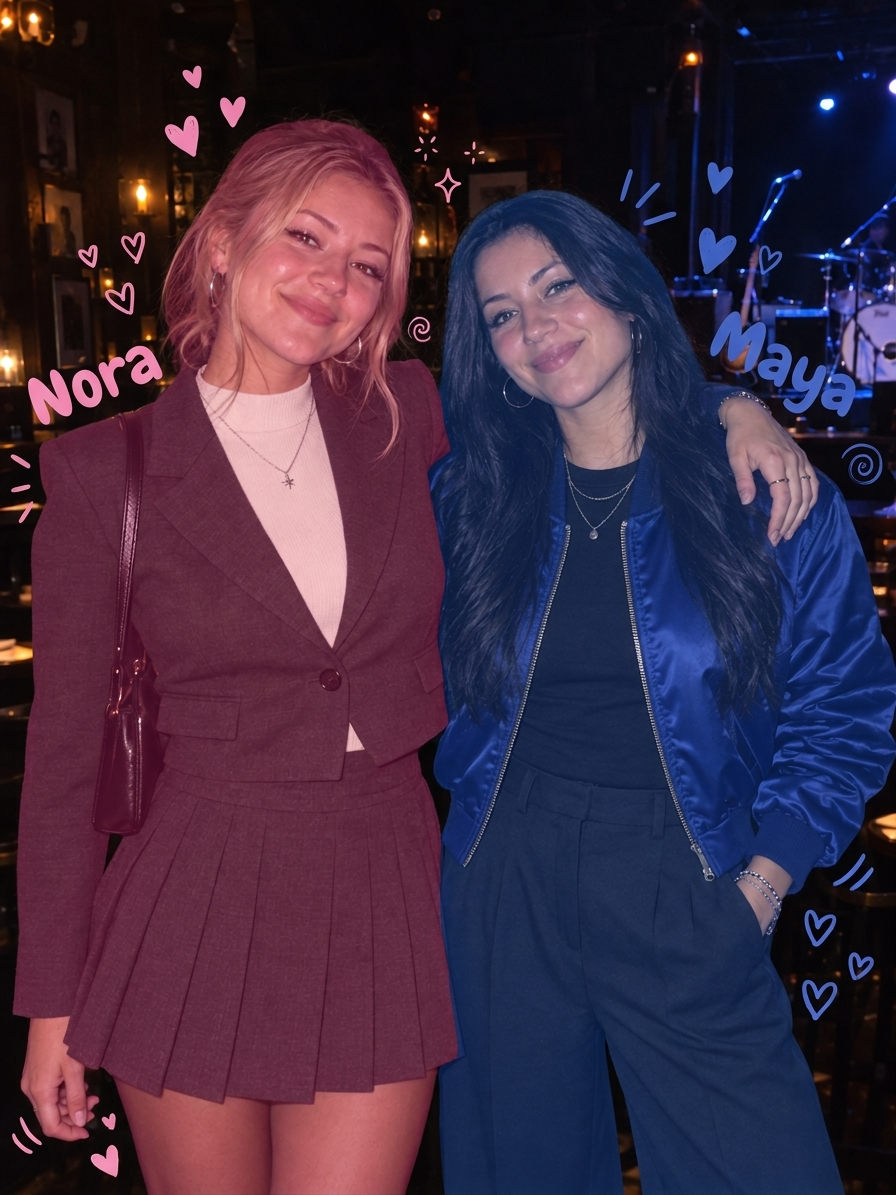
Actual AI example · Best-friend color edit
THE RECIPE
Your pink and blue photo, in three steps
Turn one photo of two friends into a translucent pink-and-blue PNG with cute doodles and optional names. Choose each person’s color; AI handles the edit without tracing or painting.
- 01
Your two-person photo
Use a photo with two people whose heads are clearly separated.
- 02
Who gets which color?
Left is pink and right is blue by default. Swap colors with one tap and optionally add your names. Left and right refer to the heads in your photo.
- 03
Generate your photo
The credit price is shown before you generate. After safety checks, download your finished PNG here or from My creations.
Questions before you start
Do I need to select or trace each person?
No. Upload one two-person photo and choose the colors. AI adds translucent tints, cute decorations and your optional names, aiming to keep faces and photo details visible. Results can vary, especially where people overlap.
Does it make a video?
This experience makes a static PNG photo. It does not include music, album artwork or a reveal animation.
Which photos work best?
Choose exactly two people with clearly visible outlines. Overlapping hands, hair and crowded scenes can affect the result. AI edits may vary; a new generation uses credits.